Developer’s guide: Spheres
This is about the implementation of spheres. Because they are different in every geometry and there are special classes like Cayley-Klein spheres, the design has to be more complex than that of our other geometric objects, which can be described purely in projective terms. Essentially, we just use the Bridge pattern.
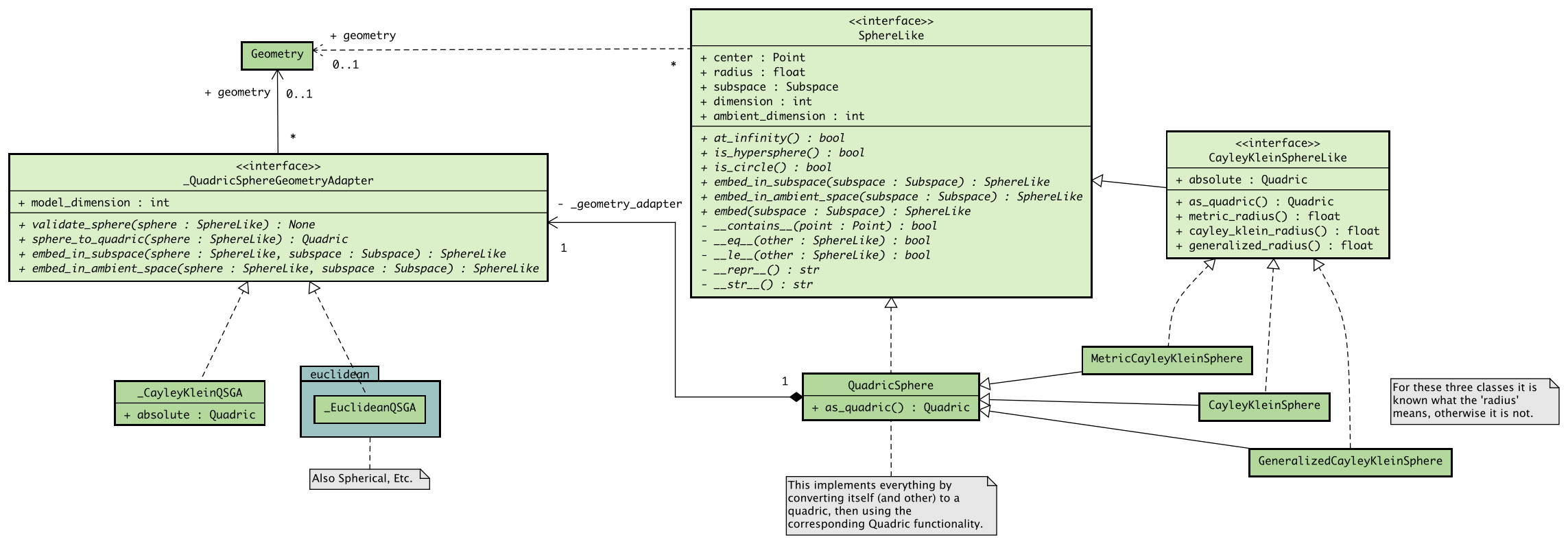
Here’s a UML class diagram. We will describe everything in words later as well.
Design goals and history
Generality: Allow for varying interpretations of the radius, in terms of the metric, Cayley-Klein radii and whatever else will come up
No complicated inheritance schemes
Minimize duplicate code
No separate sphere class for each geometry model
Separate specification from implementation so the implementation can change easily in the future
Decouple spheres from geometry classes
The original idea was that spheres contain geometry model objects directly, not the current geometry bridges. Because of this, the two influenced each other far too much.
Geometry model classes have the responsibility of bundling together functions that belong to that model. This should be completely separate from implementations of spheres.
The Geometry bridges know about the implementations of both and mediate between them.
Cayley-Klein spheres as a special case
The general architecture
The implementation consists of the following parts:
An interface
SphereLikewhich defines functionality that every sphere should implement. A sphere for us is just some set in projective space defined in some way by a center, a radius and a containing subspace.A realization
QuadricSpherewhich has to additionally define a methodquadricwhich converts the sphere to a quadric. Essentially all other functionality (dimension,__contains__,__eq__etc.) is defined by converting to a quadric first and then using the corresponding quadric functionality. All the spheres that we care about so far can also be described as quadrics. If other spheres arise, we need a different implementation for those.An interface
_QuadricSphereGeometryBridge.An object of this type will be stored in an attribute
_geometry_bridgeof theQuadricSphere.It provides methods that implement functionality which differs between all geometry models, (
sphere_to_quadric,validate_sphereetc.). These methods are used byQuadricSphere. For examples.quadric()just returnss._geometry_bridge.sphere_to_quadric(s).
Since all this makes creating spheres more difficult than just instantiating a class, they should be created with factory methods belonging to the geometry model classes.
Cayley-Klein spheres
From this general sphere architecture we derive an important special case for us: Cayley-Klein spheres. The implementation consists of these parts:
An interface
CayleyKleinSphereLikewhich adds some behavior toSphereLike.Three classes derived from
QuadricSpherewhich also implement this interface. In increasing generality:MetricCayleyKleinSphere,CayleyKleinSphereandGeneralizedCayleyKleinSphere.Since these are closely related and they all implement
CayleyKleinSphereLike, they can be treated the same in most functions using their common methodsmetric_radius(),cayley_klein_radius()andgeneralized_radius().The interpretation of the
radiusattribute of these classes is clearly defined.
An implementation
_CayleyKleinQSGBof_QuadricSphereGeometryBridge. It has two attributes:absolute, the absolute quadric.geometry, aMetricCayleyKleinGeometryobject. this object’s methodsmetric_to_cayley_klein_distance()andcayley_klein_distance_to_metric()are used to convert between Cayley-Klein and metric radius. Because of this, it is optional forCayleyKleinSphereandGeneralizedCayleyKleinSpherebut mandatory forMetricCayleyKleinSphere. If not given, this isNone.
Things to take note of
A priori it is not clear how the radius of a general sphere, including a
QuadricSphere, should be interpreted, e.g. in terms of a metric or some other way.The geometry model class returned by
SphereLike.geometry()should provide an explanation if it is non-obvious, i.e. not in terms of the metric.In reality, the method
_QuadricSphereGeometryBridge.sphere_to_quadric()interprets the radius.
With this implementation you can’t in general dispatch functions based on the type of a sphere. You have to use the sphere’s
geometryto interpret the sphere or just ignore it and use the given center, radius and subspace.
Guide to implementing a new kind of sphere
If your sphere can also be described as a quadric:
Either use
QuadricSpheredirectly or subclass it. Let’s assume the former.Implement the
_QuadricSphereGeometryBridge, say as_MyQSGB, describing how your sphere works. This implementation should probably be private and reside in a geometry module.You can now create an instance of your sphere:
qsgb = _MyQSGB(your_parameters_here)
my_sphere = QuadricSphere(center, radius, geometry_bridge=qsgb)
Add
SphereFactoryas a parent class to the geometry model class your sphere belongs to. Implement thespherefactory method as described in theSphereFactoryinterface, automating the sphere creation process.
And that’s it!
If your sphere can not be described as a quadric, you have to write your own implementation inheriting from SphereLike. How you implement things is up to you, but you could think about also using bridges similar to QuadricSphereGeometryBridge if your sphere generalizes at all to different geometries.