Animating ddg Objects
This guide explains how to animate ddg objects (and their visualizations in Blender) by introducing parameters that can be accessed and changed via Blender’s GUI. Animations can easily be created by adding keyframes to the parameters.
Adding Parameters with a Callback Function
The most central tool for creating animations is the function
add_props_with_callback().
You pass the labels and initial values of the parameters as well as a
callback function in the function call.
The callback function will be executed each time one of the parameters changes its value.
The parameters, called Blender properties, can now be accessed via Blender’s GUI.
Here is a basic example:
from ddg.blender import props


def print_props(a, b, c, s):
    print(f"{a, b, c, s = }")


props.add_props_with_callback(
    print_props,
    ("a", "b", "c", "s"),  # labels for the properties
    -1.0,  # initial parameters
    1.0,
    0.5,
    -1,
)
Note
The labels “a”, “b”, “c” and “s” of the parameters can be chosen freely. The callback function will be called with the parameters as arguments in given order.
The type of the initial parameters determines the type
of the parameters, e.g. “0” will result in int, “0.0” in float.
The example creates the properties a, b, c and s.
In Blender’s 3D Viewport you can click on the little arrow to the right side
of the coordinate system to open the sidebar. Alternatively you can also press ‘n’.
In addition to the Item, Tool and View tabs, you now also find a DDG tab that
stores the Blender properties.
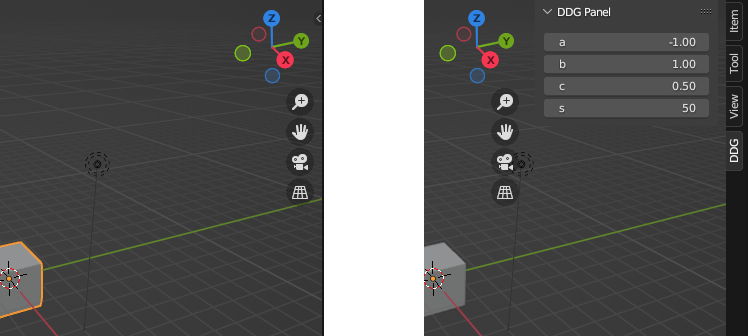
If we adjust any of them,
the callback function print_props will be executed, and
will print the properties values to the console.
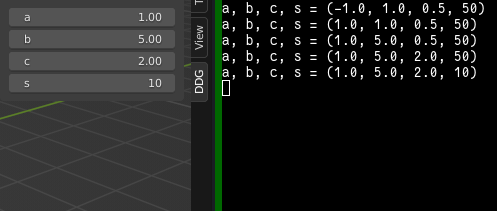
Note
The properties need to reside on some object inside of Blender.
We store them on the scene, which can be obtained with
bpy.context.scene. This is important to know if you want to
access these properties via the API (e.g.
bpy.context.scene.a) for example when animating them.
Warning
If there is no activity, even when changing the parameters, check the console you have started Blender with. Error messages will appear there without being shown in Blender.
Warning
Since closing Blender loses all Python state, the callback will no longer exist after saving and reloading a .blend file.
Parameter dependent ddg Objects
For more interesting examples involving geometric objects,
we can replace print_props by a function that creates Blender objects.
For example,
import ddg

vertical_line_collection = ddg.blender.collection.collection("Vertical Line")


def f(x):
    # Clear the collection.
    ddg.blender.collection.clear([vertical_line_collection], deep=True)
    # Link new objects to the collection.
    s = ddg.geometry.subspace_from_affine_points((x, 0, 0), (x, 1, 0))
    ddg.blender.convert(s, "Vertical Line", collection=vertical_line_collection)


ddg.blender.props.add_props_with_callback(
    f,
    ("x",),  # label for the property
    0.0,  # default property value
)
The above callback is simple and robust.
However, the callback function might be expensive to compute.
If we wish to access previously computed results, hide_previous() may be useful.
This might be the case if we want to replay an animation as described in Creating an Animation.
import ddg


@ddg.blender.props.hide_previous
def f(x):
    # Create new collection and objects *within* f.
    collection = ddg.blender.collection.collection("Vertical Line")
    s = ddg.geometry.subspace_from_affine_points((x, 0, 0), (x, 1, 0))
    ddg.blender.convert(s, "Vertical Line", collection=collection)
    # Return a collection or Blender object.
    return collection


ddg.blender.props.add_props_with_callback(
    f,
    ("x",),  # label for the property
    0.0,  # default property value
)
The downside is that memory usage grows with the number of calls to the callback function. Blender also doesn’t handle many objects well and may crash.
Finer Control over Properties
If you want to set the description, minimum or maximum value of a property and more, you’ll have to define the properties yourself:
import functools

import bpy

import ddg


@ddg.blender.props.hide_previous
def f(x):
    # Create new collection and objects *within* f.
    collection = ddg.blender.collection.collection("Vertical Line")
    s = ddg.geometry.subspace_from_affine_points((x, 0, 0), (x, 1, 0))
    ddg.blender.convert(s, "Vertical Line", collection=collection)
    # Return a collection or Blender object.
    return collection


ddg.blender.props.add_props_with_callback(
    f,
    ("x",),  # label for the property
    0.0,  # default property value
)


ddg.blender.props.add_props_with_callback_from_constructors(
    f,
    {"x": functools.partial(bpy.props.FloatProperty, default=-1.0, min=-1.0, max=5.0)},
    {},
)
Consult the Blender documentation for all the options.
Creating an Animation
Like any Blender properties, DDG properties can be keyframed and interpolated. In particular, the library’s tools for keyframes can be applied, with the slight catch that we store the interactive properties on Blender’s scene, as mentioned above.
To animate the parameter x we already added in the example above, we could do:
import bpy

import ddg


@ddg.blender.props.hide_previous
def f(x):
    # Create new collection and objects *within* f.
    collection = ddg.blender.collection.collection("Vertical Line")
    s = ddg.geometry.subspace_from_affine_points((x, 0, 0), (x, 1, 0))
    ddg.blender.convert(s, "Vertical Line", collection=collection)
    # Return a collection or Blender object.
    return collection


ddg.blender.props.add_props_with_callback(
    f,
    ("x",),  # label for the property
    0.0,  # default property value
)

SCENE = bpy.context.scene
FPS = 24
ddg.blender.animation.set_keyframe(SCENE, 0 * FPS, "x", -1.0)
ddg.blender.animation.set_keyframe(SCENE, 3 * FPS, "x", 1.0)
For a more detailed guide on setting and editing keyframes, see Blender Keyframes.
Replaying animations is the primary use-case for hide_previous(), because it caches the results.
To find out more about rendering animations check out our Rendering guide.