Conics from Circles (Animation)
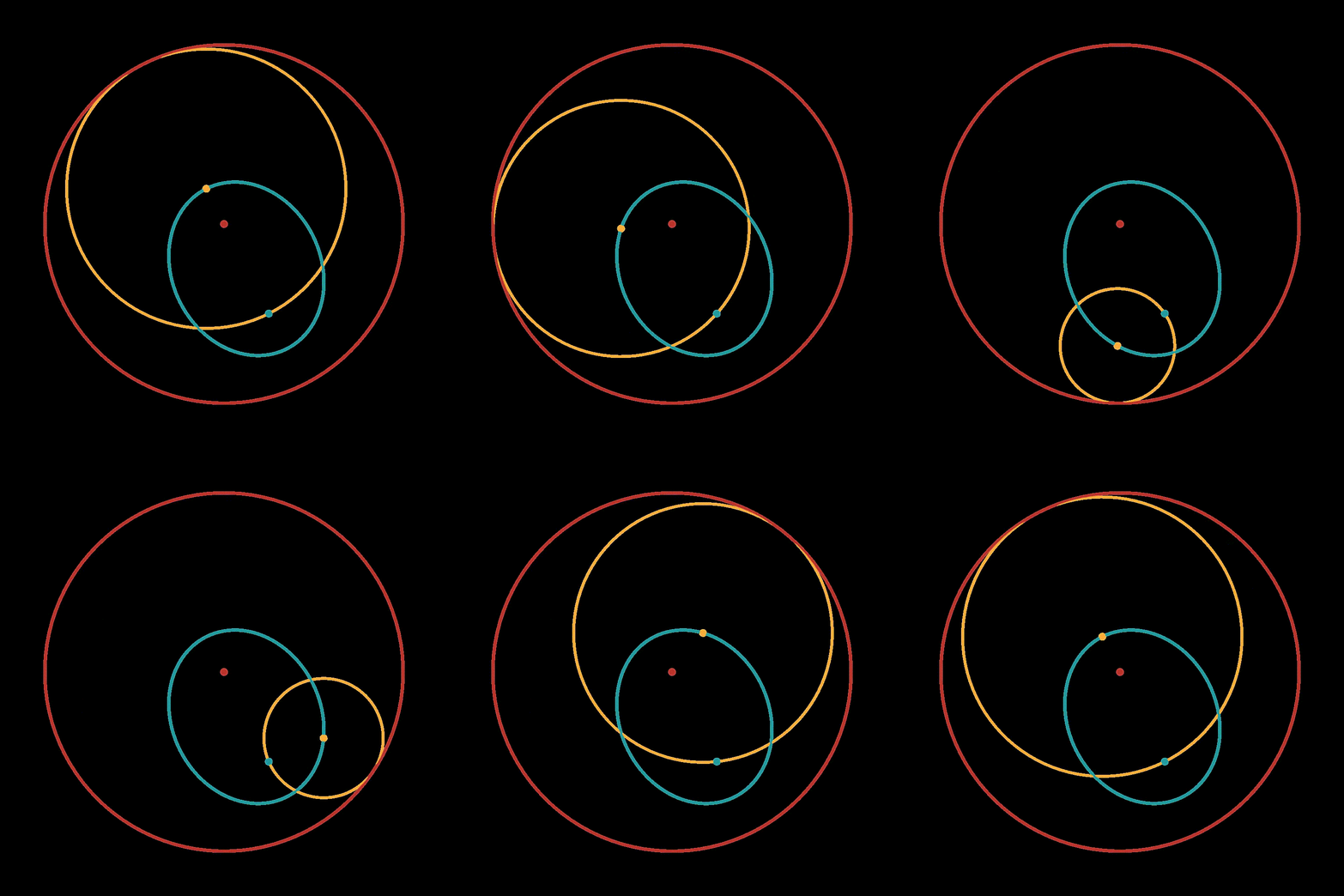
This example demonstrates an animation illustrating
the construction of an ellipse using circles
in the Euclidean plane.
You can see the full code at
conics_from_circles.py.
Setup
We start off by importing the necessary libraries.
# Import necessary libraries and modules
import bpy
import numpy as np

import ddg
from ddg.geometry import euclidean_models
We are also going to clear the whole scene and create the geometry we will be working in.
# Clear existing objects and materials in Blender scene
ddg.blender.object.clear()
ddg.blender.material.clear()

EUC2D = euclidean_models.ProjectiveModel(2)
Calculations
Now we are going to define the calculations necessary for this First we define a function calculates a smaller circle centered on the constructed ellipse and tangent to the larger circle.
# Function to calculate a smaller circle centered on the ellipse
def small_circle(theta, ellipse, F1):
    """Returns smaller circle with center on the ellipse and tangent to big circle.

    Parameters
    ----------
    theta : float
        Plugged into a parametrization of the ellipse to find center of small circle.
        2 pi - periodic.
    ellipse : ddg.geometry.Quadric
        The ellipse from the construction
    F1 : ddg.geometry.Point

    Returns
    -------
    ddg.geometry.spheres.SphereLike
        Euclidean sphere
    """
    sn = ddg.to_smooth_net(ellipse, affine=True)
    c = ddg.geometry.subspace_from_affine_points(sn(theta))
    r = np.linalg.norm(c.affine_point - F1.affine_point)
    return EUC2D.sphere(c, r)
Then we are going to define the larger circle with a specified center (F2) and radius, as well as a point F1.
# Define the properties of the big circle and the foci F1 and F2
big_circle = EUC2D.sphere(ddg.geometry.subspace_from_affine_points([1, 1]), 2)
F2 = big_circle.center
big_r = big_circle.radius
F1 = ddg.geometry.subspace_from_affine_points([2, 1.5])
# The fact that a=big_r/2 can be seen by considering a single circle with
# center on the line connecting F1 and F2.
ellipse = EUC2D.ellipse_from_foci(F1, F2, big_r / 2)
Visualization
Now we can begin with the visualization process. We start off by setting up the camera and configuring some render settings.
# Define visualization settings
SCENE = bpy.context.scene
WORLD = bpy.data.worlds["World"]

# Create and configure camera and rendering settings
camera = ddg.blender.camera.camera(
    type_="ORTHO",
    location=(F2.embed().affine_point + np.array([0.0, 0.0, 2.0])),
)
ddg.blender.camera.look_at_point(camera, F2.embed().affine_point)
# Change this if the radius of the big circle changes
camera.data.ortho_scale = 5.0
SCENE.camera = camera

SCENE.render.resolution_x = SCENE.render.resolution_y = 1024
# Make world background transparent
SCENE.render.film_transparent = True
# Set render engine to Eevee because it's orders of magnitude faster and
# suffices for this application
SCENE.render.engine = "BLENDER_EEVEE"
SCENE.view_settings.view_transform = "Raw"
# Set world color to pure white and (emission?) strength to 0.5
WORLD.node_tree.nodes["Background"].inputs[0].default_value = (1, 1, 1, 1)
WORLD.node_tree.nodes["Background"].inputs[1].default_value = 1
Next we create materials and colors.
# Create materials and define colors
COL_BIG_CIRCLE = np.array([168, 32, 26]) / 255
COL_SMALL_CIRCLE = np.array([236, 154, 41]) / 255
COL_ELLIPSE = np.array([15, 136, 141]) / 255
mat_small_circle = ddg.blender.material.material(
    color=COL_SMALL_CIRCLE, name="Small circle"
)
mat_big_circle = ddg.blender.material.material(
    color=COL_BIG_CIRCLE, name="Big circle", alpha=0.5
)
mat_ellipse = ddg.blender.material.material(color=COL_ELLIPSE, name="Ellipse")
And now we can visualze the objects in Blender.
# Render regular objects
big_circle_bobj = ddg.blender.convert(big_circle, "big_circle", material=mat_big_circle)
big_circle_bobj.data.bevel_depth = 0.015
f2 = ddg.blender.convert(F2, "F2", material=mat_big_circle)
ddg.blender.convert(F1, "F1", material=mat_ellipse)
ellipse_bobj = ddg.blender.convert(ellipse, "Ellipse", material=mat_ellipse)
ellipse_bobj.data.bevel_depth = 0.015
Animation
Finally, to get the animations we first define the following function.
# Function to generate small circles during animation
small_circle_collection = ddg.blender.collection.collection("small circle")


def small_circle_callback(theta):
    ddg.blender.collection.clear([small_circle_collection], deep=True)
    sc = small_circle(theta, ellipse, F1)
    bobj_sc = ddg.blender.convert(
        sc, "Small Circle Animation", mat_small_circle, small_circle_collection
    )
    bobj_sc.data.bevel_depth = 0.0125

    ddg.blender.convert(
        sc.center, "Small circle center", mat_small_circle, small_circle_collection
    )
And then set some animation settings.
# Add animation properties and keyframes
ddg.blender.props.add_props_with_callback(small_circle_callback, ["theta"], 0.0)

FPS = 50
ddg.blender.animation.clear_animation_data(SCENE)
ddg.blender.animation.set_keyframe(SCENE, 0 * FPS, "theta", 0.0)
ddg.blender.animation.set_keyframe(SCENE, 3 * FPS, "theta", 2 * np.pi)
ddg.blender.animation.set_end_frame(3 * FPS)