S-Exp circle pattern
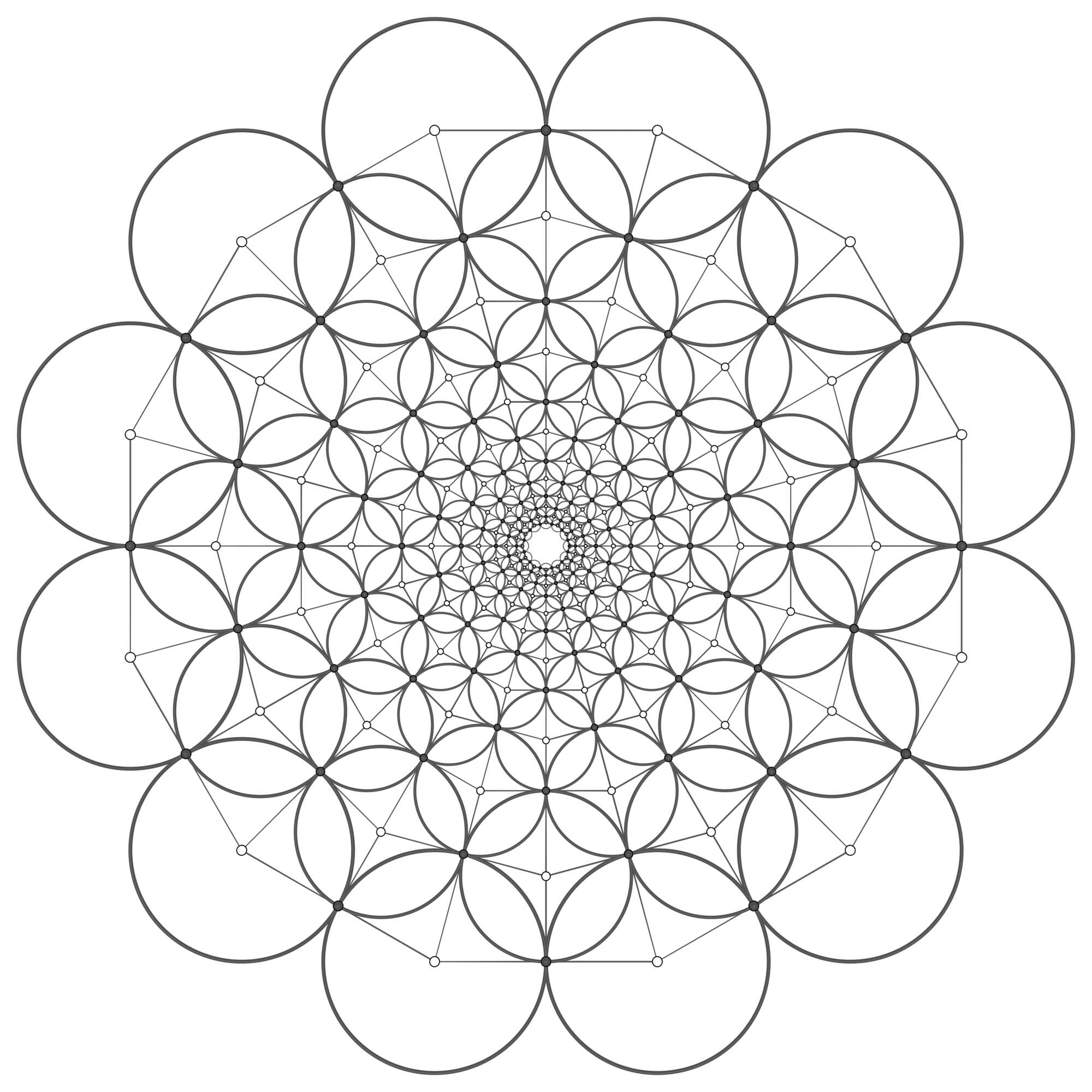
In this example, we will construct an S-Exp orthogonal circle pattern with the combinatorics of a square grid, see e.g. [BP99: Discretization of surfaces and integrable systems]. For its construction we use the explicit formulas given in [BHS06: Minimal surfaces from combinatorics]. The S-Exp circle pattern can be used as Weierstrass data for constructing discrete S-isothermic minimal and maximal catenoids in Euclidean and Lorentz-Minkowski space, as we will do in this example.
You can download the full script
s_exp.py and
an obj file with an example
s_exp.obj.
Setup
We begin by importing required modules, clearing the Blender scene, and defining a function to create the s_exp circle pattern.
import os

import bpy
import numpy as np

import ddg

ddg.blender.scene.clear(deep=True)
ddg.blender.material.clear()
euc = ddg.geometry.euclidean(2)


def s_exp(U, V):
    """
    Function to create an s-exp orthogonal circle pattern in the plane.
    Uses square grid combinatorics with UxV vertices with the
    topology of a cylinder.

    The resulting combinatorics will have black and white
    vertices (v.color = 'b', v.color = 'w') where white
    vertices correspond to circle centers and
    black vertices correspond to points of intersection.

    Returns
    -------
    ddg.halfedge.Surface
        Halfedge object containing the 2d coordinates in the vertex attribute 'co'.
    """

    # Start with ifs grid of cylinder topology and convert it to halfedge
    grid_ = ddg.indexedfaceset.grid_with_periodicity((U, V), periodicity=(0, 1))
    combinatorics = ddg.indexedfaceset.indexed_face_set_to_surface(grid_)
    combinatorics.verts.add_attribute("co")
    for v in combinatorics.verts:
        v.co = grid_.vertex_attributes["uv"][v.ifs_index]
    delattr(combinatorics.verts, "ifs_index")
    delattr(combinatorics.faces, "ifs_face_index")

    # Bicolor vertices
    ddg.halfedge.bicolor_vertices(combinatorics, colors=["w", "b"])
    white_verts = [v for v in combinatorics.verts if v.color == "w"]
    black_verts = [v for v in combinatorics.verts if v.color == "b"]

    # Determine circle centers (see e.g. BHS06: Minimal surfaces from combinatorics)
    combinatorics.verts.add_attribute("radius")
    rho = 2 * np.pi / V
    alph = np.arctanh(0.5 * np.abs(1 - np.exp(2j * rho)))
    max_norm = 0.0

    for v in white_verts:
        i, j = v.co
        c = np.exp(alph * i) * np.exp(1j * rho * j)
        v.co = np.array([c.real, c.imag])
        v.radius = np.sin(rho) * np.abs(c)
        max_norm = max(max_norm, np.linalg.norm(v.co))

    # Scale to unit disc
    if max_norm > 1:
        for v in white_verts:
            v.co = v.co / max_norm
            v.radius = v.radius / max_norm

    # Determine touching points for interior vertices and for boundary vertices
    for v in black_verts:
        out_edges = [e for e in ddg.halfedge.out_edges(v)]
        if len(out_edges) == 4:
            v1 = out_edges[2].head
            v2 = out_edges[0].head

        elif len(out_edges) == 3:
            out_sorted = sorted(
                out_edges, key=lambda e: not ddg.halfedge.is_boundary_vertex(e.head)
            )
            v1, v2 = out_sorted[0].head, out_sorted[1].head

        vec = v2.co - v1.co
        v.co = v1.co + v1.radius * vec / np.linalg.norm(vec)

    return combinatorics
Construction
Using the previously defined function, we construct a halfedge object storing the circle center and touching point coordinates.
# Parameters that determine the combinatorics
# V must be even to bi-color the vertices.
U, V = 15, 30
assert V % 2 == 0
s_exp_cp = s_exp(U, V)
Visualization
In the visualization step, we compute and display the circles of the orthogonal circle pattern.
# Visualization
mats = [
    ddg.blender.material.material(color=(0.0, 0.0, 0.0)),
    ddg.blender.material.material(color=(1.0, 1.0, 1.0)),
]
ddg.blender.edges(s_exp_cp, "combinatorics", radius=0.005, material=mats[0])

for v in s_exp_cp.verts:
    mat = mats[0] if v.color == "b" else mats[1]
    ddg.blender.convert(
        ddg.geometry.Point([*v.co, 1]),
        f"pt_{v.index}",
        point_radius=np.linalg.norm(v.co) ** 0.5 / 100,
        material=mat,
    )
    if v.color == "w":
        sphere = euc.sphere([*v.co, 1], v.radius)
        sphere_array = ddg.arrays.from_quadric_sphere(sphere, 10)
        ddg.blender.convert(
            sphere_array,
            f"sphere_{v.index}",
            material=mats[0],
            curve_radius=np.linalg.norm(v.co) ** 0.5 / 250,
        )
Export OBJ
We can also export an OBJ file for later use. You can download it here:
s_exp.obj.
We convert the coordinates to 3d coordinates with z=0.
# Export obj
for v in s_exp_cp.verts:
    v.co = np.array([*v.co, 0.0])
dir = os.path.dirname(os.path.realpath(__file__))
ddg.conversion.obj.halfedge.hds_to_obj(s_exp_cp, filename=f"{dir}/s_exp.obj")