Pascal Lines and Brianchon Lines
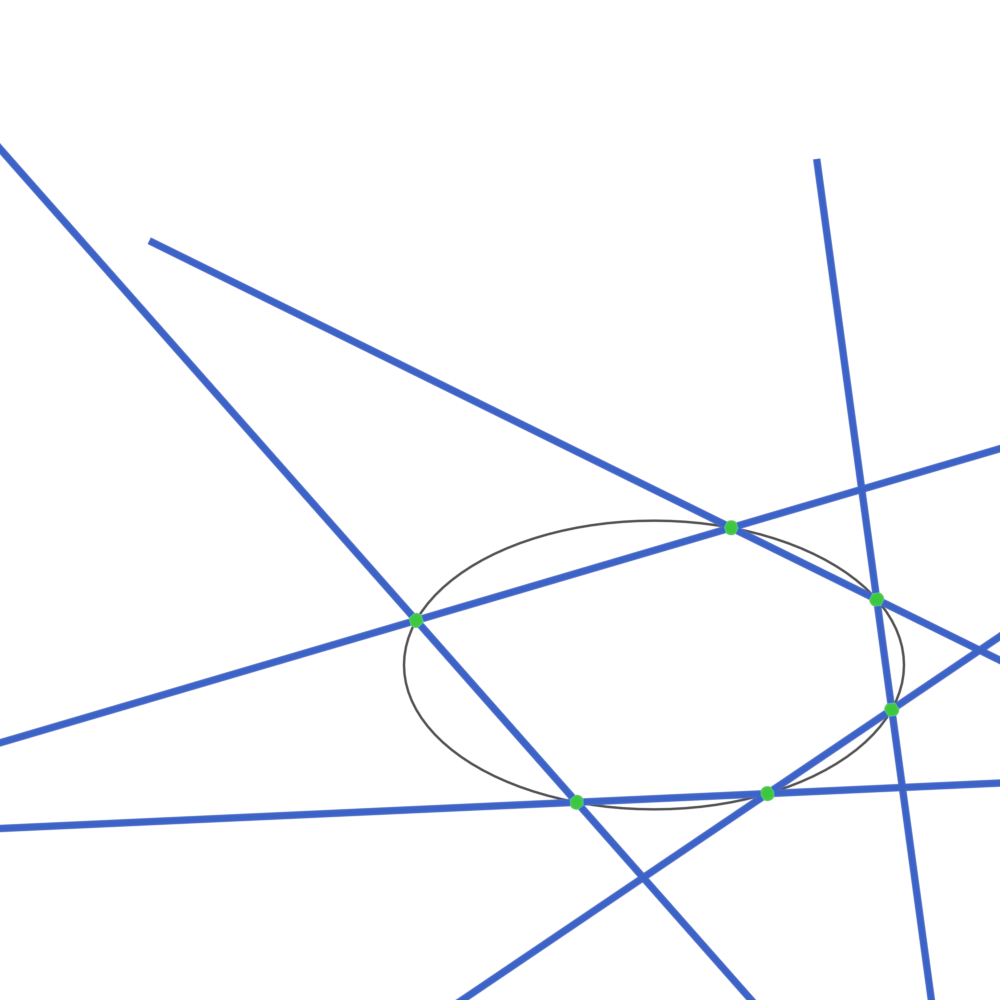
In this example we are going to
create and display Pascal lines,
their intersections, Brianchon lines
and diagonals on a quadric surface.
You can see the full code at
pascal.py.
Setup
We start off by importing the necessary libraries.
import bpy
import numpy as np

import ddg
We are also going to clear the whole scene.
# Clear existing mesh and curve objects in Blender
ddg.blender.mesh.clear()
ddg.blender.curve.clear()
Functions
Now we will define the a helper function which will draw projective lines.
# Helper function to draw projective lines
def draw_line(
    line,
    name,
    material=None,
    collection=None,
):
    bobj = ddg.blender.convert(
        line,
        name,
        material=material,
        collection=bpy.data.collections.get(collection),
    )
    bobj.data.bevel_depth = 0.015
    return bobj
Math
With the set up complete, we can now calculate the intersections. First we have to create a quadric.
# Create a quadric surface with specific coefficients
quadric = ddg.geometry.Quadric(np.diag([1, 3, -1]))
quadric_net = ddg.to_smooth_net(quadric, affine=True)

# Generate parameters for points on the quadric surface
# (order matters)
pt_parameters = [(k + 0.2) * 2 * np.pi for k in [0, 0.125, 0.25, 0.375, 0.5, 0.75]]
pt_coords = [quadric_net(t) for t in pt_parameters]
points = [ddg.geometry.subspace_from_affine_points(co) for co in pt_coords]
With this we can create the actual lines and intersections.
# Create Pascal lines by joining pairs of points
pascal_lines = [ddg.geometry.join(points[i], points[(i + 1) % 6]) for i in range(6)]

# Find intersections of Pascal lines
pascal_intersections = [
    ddg.geometry.meet(pascal_lines[i], pascal_lines[i + 3]) for i in range(3)
]

# Create a Pascal line that goes through two of the intersections
pascal_line = ddg.geometry.join(pascal_intersections[0], pascal_intersections[1])

# Create Brianchon lines by dualizing the points
brianchon_lines = [p.dual() for p in points]

# Dualize Pascal lines to create Brianchon intersections
brianchon_intersections = [l.dual() for l in pascal_lines]

# Dualize Pascal intersection points to create Brianchon diagonals
brianchon_diagonals = [p.dual() for p in pascal_intersections]

# Dualize Pascal line to create a Brianchon triple intersection point
brianchon_triple_intersection = pascal_line.dual()
Visualization
Finally we can visualize all of this in Blender. We start by creating the quadric Blender object.
# Sample and visualize the quadric surface
bobj = ddg.blender.convert(
    quadric,
    "quadric",
    material=black,
    collection=pascal_collection,
)
bobj.data.bevel_depth = 0.005
Next we dualize the quadric.
# Dualize the quadric surface and visualize it
bobj = ddg.blender.convert(
    quadric.dual(),
    "dual_quadric",
    material=black,
    collection=brianchon_collection,
)
bobj.data.bevel_depth = 0.005
And finally we visualize the lines, intersections and points.
# Visualize Pascal lines, intersections, and points
for (i, line) in enumerate(pascal_lines):
    draw_line(line, f"helper_line_{i}", collection="Pascal", material=blue)
draw_line(pascal_line, "THE line", material=yellow, collection="Pascal")
for (i, point) in enumerate(pascal_intersections):
    ddg.blender.vertices(
        point,
        f"pascal_intersections_{i}",
        radius=0.03,
        collection=bpy.data.collections.get("Pascal"),
        material=red,
    )
for (i, point) in enumerate(points):
    ddg.blender.vertices(
        point,
        f"points_{i}",
        radius=0.03,
        collection=bpy.data.collections.get("Pascal"),
        material=green,
    )

# Visualize Brianchon lines, diagonals, intersections, and the triple intersection point
for (i, line) in enumerate(brianchon_lines):
    draw_line(line, f"brianchon_lines_{i}", collection="Brianchon", material=green)
for (i, line) in enumerate(brianchon_diagonals):
    draw_line(line, f"brianchon_diagonals_{i}", collection="Brianchon", material=red)
for (i, point) in enumerate(brianchon_intersections):
    ddg.blender.vertices(
        point,
        f"brianchon_intersections_{i}",
        radius=0.03,
        collection=bpy.data.collections.get("Brianchon"),
        material=blue,
    )
ddg.blender.vertices(
    brianchon_triple_intersection,
    "brianchon_triple_intersection",
    radius=0.03,
    collection=bpy.data.collections.get("Brianchon"),
    material=yellow,
)