Cycloidal Pendulum
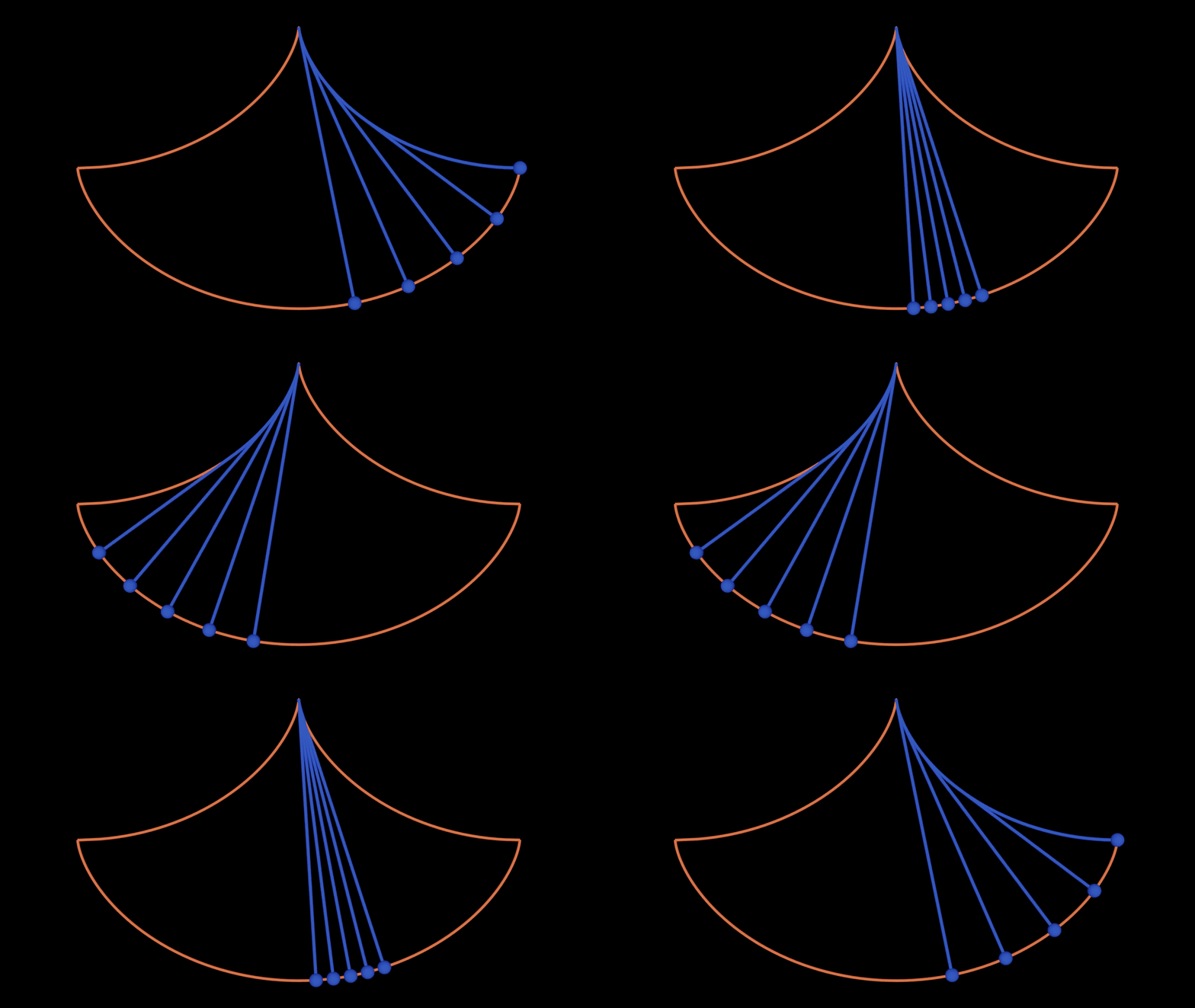
This example is about the motion of a cycloidal pendulum, which demonstrates the isochrony may rise from suspending a pendulum on the cusp of an inverted cycloid.
Animating the pendulum is done by computing its evolute for the curved component of the pendulum string and computing the trajectory normal to connect the mass and the curved component with a straight string.
You can see download the full script at
cycloidal_pendulum.py
.
Helper Functions
We will mostly use helper functions to generate tangent edges, normal vertices, and envelope a which follows from the example Envelope, Evolute, Orthogonal Trajectory and Involute of Curves.
An additional utility function used is extend_evolute, which extends the evolute to
next vertices.
#############################################
#  HELPER FUNCTIONS
#############################################


def tangent_edges(fct):
    """Returns a function that, for a given index,
    returns the edge tangent line with given index of the
    discrete curve in the input.
    The i'th edge tangent line is the join of fct(i) and fct(i+1).
    """

    @lru_cache(maxsize=128)
    def tangent_edge(i):
        tangent = subspace_from_affine_points(fct(i), fct(i + 1))
        return orthonormalize_and_center_subspace(
            tangent, np.sum([fct(i), fct(i + 1)], axis=0) / 2
        )

    return tangent_edge


def normal_vertices(fct):
    """Returns a function that, for a given index,
    returns the vertex normal line with given index of the
    discrete curve in the input.
    The i'th vertex normal line is the orientation reversing
    angle bisector of the (i-1)'st and i'th edge tangent line.
    """

    @lru_cache(maxsize=128)
    def normal_vertex(i):
        normal = angle_bisector_orientation_reversing(
            tangent_edges(fct)(i - 1), tangent_edges(fct)(i)
        )
        return orthonormalize_and_center_subspace(normal, fct(i))

    return normal_vertex


def envelope(g):
    """The return value of the function g is assumed to be a line.
    Then this function returns a function that, for a given index i,
    returns the intersection of the (i-1)'st and i'th
    line of g.
    """

    @lru_cache(maxsize=128)
    def new_curve_fct(i):
        point = intersect(g(i), g(i + 1))
        return point.affine_point

    return new_curve_fct


def extend_evolute(evolute, dnet):
    """
    Extends a given edge evolute with the vertices
    first and last vertex of a given discrete net.
    """
    l, r = dnet.domain[0][0], dnet.domain[0][1]

    def extended_evolute(i):
        if i == l:
            return dnet.fct(l)
        elif i == r - 1:
            return dnet.fct(r)
        else:
            return evolute(i)

    return extended_evolute
Setup
#############################################
# Setup
#############################################


# Clear the existing objects in the Blender scene
ddg.visualization.blender.scene.clear()
ddg.visualization.blender.material.clear()
Curve and Specified Helper Functions
We define the parametrization curve and sample the nets. Furthermore we create helper functions that generates traces of nets with different amplitudes.
#############################################
# CURVE AND TRACE NET GENERATION
#############################################

sampling_curve = np.pi / 100
bevel_curve = 0.02


# We define a parametrization for a cycloid pendulum trajectory.
def parametrization(u, A=1, r=1, w=1):
    theta = lambda t: np.arcsin(A * np.cos(w * t))
    return [r * (2 * theta(u) + np.sin(2 * theta(u))), r * (-3 - np.cos(2 * theta(u)))]


# Smooth trajectory of pendulum of largest amplitude
smooth_domain = [[0, np.pi]]
trajectory_snet = ddg.nets.SmoothNet(parametrization, domain=smooth_domain)
trajectory_dnet = ddg.sample_smooth_net(trajectory_snet, sampling=sampling_curve)

# And it's smooth evolute
trajectory_normal_vertex = normal_vertices(trajectory_dnet.fct)
trajectory_evolute_edge = envelope(trajectory_normal_vertex)

# Initial values of the pendulum
n_samples = 100
amplitudes = [1 / 5, 2 / 5, 3 / 5, 4 / 5, 1.0]


# Prepares DiscreteNet and Evolute Edge to corresponding amplitude and n_sampling
def pendulum_trace(amplitudes, n_sampling):
    """Generate DiscreteNet and corresponding evolute edge of a pendulum trajectory for
    a given amplitude and sampling

    Parameters
    ----------
    amplitudes : list(float)
        Amplitudes of cycloid pendulum
    n_sampling : int
        Number of sampling

    Returns
    -------
    list(tuple(DiscreteNet, Wrapper Function, float, int))
        Lists of traces information in tuples, ordered as (DiscreteNet, Evolute Edge
        Amplitude, Number of sampling)
    """
    # Sampling is chosen over pi (or half a period)
    sampling = np.pi / n_sampling
    domain = [[0, np.pi]]

    traces = []

    def create_amp_param(A):
        def amp_parametrization(u):
            return parametrization(u, A=A)

        return amp_parametrization

    for A in amplitudes:
        # Trace of pendulum corresponding to starting amplitude
        trace_snet = ddg.nets.SmoothNet(create_amp_param(A), domain=domain)
        trace_dnet = ddg.sample_smooth_net(trace_snet, sampling=sampling)

        # Evolute of the trace
        evolute_edge = envelope(normal_vertices(trace_dnet.fct))

        # Return data in a 4-tuple
        traces.append((trace_dnet, evolute_edge, A, n_sampling))

    return traces
Visualization Setup
#############################################
# VISUALIZATION
#############################################


orange = material("orange", (0.8, 0.1, 0.036), 0, 0)
blue = material("blue", (0.019, 0.052, 0.445), 0, 0)


def shift_domain(a, b, domain=None):
    """Shift domain by a and b

    Parameters
    ----------
    a : int
        Shift distance from the left
    b : int
        Shift distance from the right
    domain : DiscreteDomain, optional
        DiscreteDomain to be shifted, by default None

    Returns
    -------
    DiscreteDomain
        Shifted domain.
    """
    return DiscreteInterval([[domain[0][0] + a, domain[0][1] + b]])


def visualize_2d_curve(dnet_fct, domain, material=orange, bevel=bevel_curve, **kwargs):
    """Visualize 2D curve with a specific material

    Parameters
    ----------
    dnet_fct : function
        Function of the DiscreteNet.
    domain : Domain
        Domain of the Curve
    material : Material, optional
        Blender material of the curve render, by default orange
    bevel : float, optional
        Thickness of the curve, by default bevel_curve

    Returns
    -------
    bobj
        Blender object of rendered curve.
    """
    dnet = ddg.nets.DiscreteNet(dnet_fct, domain=domain)
    return ddg.to_blender_object_helper(
        ddg.nets.utils.embed(dnet),
        material=material,
        curve_properties={"bevel_depth": bevel},
        **kwargs,
    )
Animation Setup and Static Objects
#############################################
# ANIMATION SETUP AND STATIC OBJECTS
#############################################

# Trajectory of cycloid as static objects
trajectory_bobj = visualize_2d_curve(
    trajectory_dnet.fct, trajectory_dnet.domain, name="Discrete Curve"
)

trajectory_evolute_edge_bobj = visualize_2d_curve(
    extend_evolute(trajectory_evolute_edge, trajectory_dnet),
    shift_domain(0, -1, trajectory_dnet.domain),
    name="Evolute Edge",
)

# Setup DiscreteNet for animating pendulum
traces = pendulum_trace(amplitudes, n_samples)
Main Animation Function
#############################################
# ANIMATION FUNCTION
#############################################
def visualize_cycloid_pendulum(idx, traces, link=False):
    """Visualize (create blender objects) of a cycloidal pendulum.

    Parameters
    ----------
    idx : int
        Index value along the discrete domain of the pendulum path
    traces : list(tuple)
        Trace of pendulum trajectory
    link : bool (default=False)
        Link to scene. Do not use for callbacks in sliders, by default False

    Returns
    -------
    list(bobj)
        Blender objects of pendulum
    """

    bobj_list = []
    for trace in traces:
        trace_dnet = trace[0]
        evolute_edge = trace[1]
        A = trace[2]
        n_sampling = trace[3]

        idx_mod_sampling = 2 * n_sampling - idx if idx > n_sampling else idx
        # Find the last point where the pendulum touches the evolute and add + 1
        evolute_bdy = idx_mod_sampling
        if idx_mod_sampling == n_sampling or 0 < idx_mod_sampling <= n_sampling // 2:
            evolute_bdy -= 1
        bounds = [evolute_bdy, n_sampling // 2]
        # Sort by which of the indices is larger
        bounds.sort()

        # The pendulum consists of the bounded part of the
        # evolute connected to the mass point
        def pendulum(i):
            if i == evolute_bdy:
                return trace_dnet.fct(idx_mod_sampling)
            else:
                return evolute_edge(i)

        # Pendulum
        bobj_list.append(
            visualize_2d_curve(
                pendulum,
                DiscreteInterval(bounds),
                material=blue,
                name=f"Pendulum - Amplitude={A}",
                bevel=bevel_curve + 0.005,
                link=link,
            )
        )

        # Mass of pendulum
        bobj_list.append(
            ddg.to_blender_object_helper(
                Point([*trace_dnet.fct(idx), 0, 1]),
                sphere_radius=0.1,
                material=blue,
                name=f"Pendulum Mass - Amplitude={A}",
                link=link,
            )
        )

    return bobj_list
Animation Callback and Keyframes
#############################################
# ANIMATION CALLBACK
#############################################


def callback_cycloid_pendulum(idx):
    return visualize_cycloid_pendulum(idx, traces, False)


callback = props.hide_callback(
    "construction", callback_cycloid_pendulum
)  # For many pendulum potential to crash with hide_callback

props.add_props_with_callback(
    callback,
    ("i"),  # labels for the properties
    0,  # arbitrarily chosen initial parameters
)

SCENE = bpy.context.scene
animation.set_keyframe(SCENE, 0, "i", 0)
animation.set_keyframe(SCENE, 2 * n_samples, "i", 2 * n_samples)
bpy.context.scene.frame_start = 0
bpy.context.scene.frame_end = 2 * n_samples
Rendering Setup
#############################################
# RENDERING
#############################################

# Add a point light and a camera to the scene
light = ddg.visualization.blender.light.light(
    location=(0, 0, 100), type_="SUN", energy=5
)
camera = ddg.visualization.blender.camera.camera(location=(0, -2, 11.8))
ddg.visualization.blender.render.setup_cycles_renderer()
ddg.visualization.blender.render.set_film_transparency()