Tetrahedron Cross Ratio
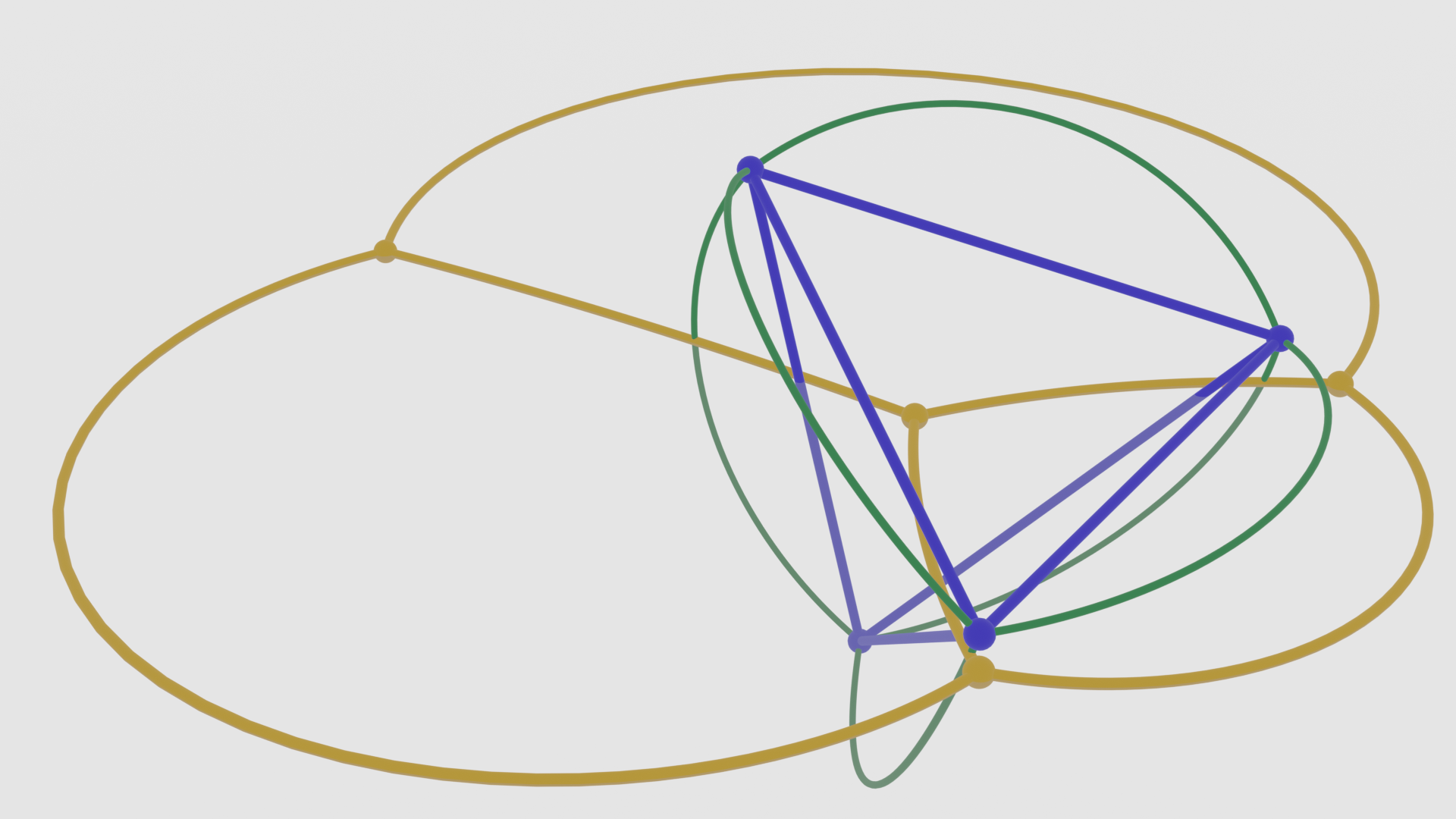
In this example we will showcase the geometric transformation
and mathematical properties of stereographic projection
in the context of a regular tetrahedron.
You can see the full code at
tetrahedron_cross_ratio.py.
Setup
We start off by importing the necessary libraries.
# Import necessary libraries and modules
import bpy
import numpy as np

import ddg
from ddg.datastructures import halfedge as hds
from ddg.datastructures.nets.utils import compose
from ddg.geometry.projections import stereographic_project
from ddg.geometry.subspaces import subspace_from_affine_points as sfap
from ddg.visualization import blender
We are also going to clear the whole scene.
# Clear existing objects and materials in Blender scene
blender.object.clear()
blender.material.clear()
Constants and Functions
Now we are going to establish the essential constants and functions necessary for the subsequent computations and visualization.
# Define a unit sphere as a quadric
UNIT_SPHERE = ddg.geometry.quadrics.Quadric(np.diag([1, 1, 1, -1]))
# Define the north pole as a point on the unit sphere
NORTH_POLE = sfap([0, 0, 1])
First we need to generate a regular tetrahedron inscribed within the unit sphere based on the position of a single vertex.
# Define a function to construct a tetrahedron inscribed in a sphere
def tetrahedron_in_sphere(vertex):
    """Return a tetrahedron inscribed in the unit sphere
    based on the position of one vertex.

    Parameters
    ----------
    vertex : array_like of shape (3,)
        The position of one vertex of the tetrahedron.
        It determines the whole tetrahedron. Vector will be normalized.

    Returns
    -------
    ddg.halfedge.Surface
        Tetrahedron as Halfedge object.
    """
    # This tetrahedron is already regular.
    tetrahedron = hds.surface_generator.tetrahedron()
    random_vertex = hds.get.get_vertex(tetrahedron)

    # Translate and scale the tetrahedron so it's inscribed in the unit sphere
    barycenter = sum(v.co for v in tetrahedron.verts) / len(tetrahedron.verts)
    for v in tetrahedron.verts:
        v.co = v.co - barycenter
    norm = np.linalg.norm(random_vertex.co)
    for v in tetrahedron.verts:
        v.co = v.co / norm

    # Rotate the tetrahedron to match the provided vertex
    F = ddg.math.euclidean.rotation_from_to(random_vertex.co, vertex, homogeneous=False)
    for v in tetrahedron.verts:
        v.co = F @ v.co

    return tetrahedron
Next we need to define a function which performs a stereographic projection of the tetrahedron onto the plane \(x_3 = 0\).
# Define a function to stereographically project a tetrahedron
def project_tetrahedron(tetrahedron):
    """Stereographically project a tetrahedron.

    Parameters
    ----------
    tetrahedron : Surface
        Halfedge object representing the tetrahedron.

    Returns
    -------
    points_projected : list of complex
        Points in the plane x3 = 0. A point [x, y, 0] is represented by complex(x, y).
        The north pole is projected to complex('inf').

        This is also the representation used in the ddg.math.complex module, so
        the cross ratio can be computed directly from the points in this list.

    edges_projected : list of ddg.SmoothCurve
        List of projected edges.
    """
    # Project each vertex of the tetrahedron to the plane x3 = 0
    points_projected = [stereographic_project(sfap(v.co)) for v in tetrahedron.verts]
    for i, p in enumerate(points_projected):
        if p == float("inf"):
            points_projected[i] = complex("inf")
        else:
            p = p.affine_point
            points_projected[i] = complex(p[0], p[1])

    # Construct edge list as a list of lists of vertices
    edges = hds.get.single_edges(tetrahedron)
    edges_projected = [project_edge_to_sphere(e) for e in edges]

    # Restrict the domain to exclude the north pole because
    # that would be projected to infinity
    for e in edges_projected:
        if sfap(e(0)) == NORTH_POLE:
            e.domain = ddg.datastructures.nets.domain.SmoothDomain([[0.1, 1]])
        elif sfap(e(1)) == NORTH_POLE:
            e.domain = ddg.datastructures.nets.domain.SmoothDomain([[0, 0.9]])

    # Transform the edges to match the projection
    def trafo(p):
        p = sfap(p)
        p_projected = stereographic_project(p)
        return p_projected.affine_point

    edges_projected_transformed = [compose(trafo, e) for e in edges_projected]

    return points_projected, edges_projected_transformed
Finally we need to project an edge of a halfedge object onto the unit sphere, ensuring it maintains its smoothness.
# Define a function to project an edge of a halfedge object to the unit sphere
def project_edge_to_sphere(edge):
    """Project an edge of a halfedge object to the unit sphere.

    Parameters
    ----------
    edge : Edge
        Edge of a halfedge object

    Returns
    -------
    SmoothCurve
    """
    p1 = edge.tail.co
    p2 = edge.head.co

    # Create a smooth curve representing the projected edge
    edge_projected = ddg.datastructures.nets.net.SmoothNet(
        lambda t: t * p1 + (1 - t) * p2, [[0, 1]]
    )
    edge_projected = compose(lambda x: x / np.linalg.norm(x), edge_projected)
    return edge_projected
Calculations
Now we are going to execute the mathematical computations required to achieve our visualization. We first construct an inscribed tetrahedron within the unit sphere based on a specified vertex and project the edges of the tetrahedron onto the unit sphere to create a list of curves on the sphere.
# Define the coordinates of one vertex of the tetrahedron (will be normalized)
my_vertex = [1, -2, 2]
# Create a tetrahedron inscribed in the unit sphere based on the provided vertex
my_tetrahedron = tetrahedron_in_sphere(my_vertex)
# Project the edges of the tetrahedron to the unit sphere
edges_on_sphere = [
    project_edge_to_sphere(e) for e in hds.get.single_edges(my_tetrahedron)
]
# Stereographically project the tetrahedron into the plane
my_points_projected, my_edges_projected = project_tetrahedron(my_tetrahedron)
Next, we stereographically project the entire tetrahedron onto the plane \(x_3 = 0\). With that we calculate the complex cross-ratio of the projected points and verifying whether it equals
# Calculate the complex cross-ratio of the projected points
# and check if it equals exp(±i*pi/3)
ccr = ddg.math.complex.cr(*my_points_projected)
assert ddg.nonexact.isclose(
    ccr, np.exp(np.pi / 3 * complex(0, 1))
) or ddg.nonexact.isclose(ccr, np.exp(-np.pi / 3 * complex(0, 1)))
Visualization
Finally we can bring it all together and visualize it. We start by defining some colors and setting up the camera.
# Define colors for visualization
BLUE = 1 * np.array((0.02, 0, 1))
GREEN = 0.3 * np.array((0, 1, 0.2))
YELLOW = 1 * np.array((1, 0.5, 0))

# Create and set up camera
camera = blender.camera.camera(location=(3, 4, 3))
blender.camera.look_at_point(camera, (0.5, -0.5, 0))
bpy.context.scene.camera = camera
Next, we define materials and collections and also set the blend mode.
# Create materials and collections for visualization
mat_tet = blender.material.material(color=BLUE, name="mat_tet")
mat_tet_on_sphere = blender.material.material(
    color=GREEN, name="mat_tet_on_sphere", alpha=0.5
)
mat_tet_proj = blender.material.material(color=YELLOW, name="mat_tet_proj")
mat_plane = blender.material.material(
    color=(0.5, 0.5, 0.5), alpha=0.25, name="mat_plane"
)
# Set blend_method for transparency to work with Eevee render engine
mat_plane.blend_method = "BLEND"

# Create collections to organize objects
tetrahedron_on_sphere_coll = blender.collection.collection("Tetrahedron on sphere")
tetrahedron_projected_coll = blender.collection.collection("Projected tetrahedron")
Now we can visualize the objects in Blender.
# Visualize the inscribed tetrahedron
ddg.conversion.blender.halfedge.hes_to_tubes_and_spheres_blender_object(
    my_tetrahedron,
    sphere_radius=0.04,
    tube_radius=0.015,
    kwargs_generator=lambda _: {"material": mat_tet},
    parent_kwargs={"name": "tetrahedron"},
)

# Visualize edges on the unit sphere
for e_ in edges_on_sphere:
    ddg.to_blender_object_helper(
        e_,
        sampling=[0.05, 60, "c"],
        material=mat_tet_on_sphere,
        collection=tetrahedron_on_sphere_coll,
        curve_properties={"bevel_depth": 0.01},
    )

# Visualize projected points and edges
for p_ in my_points_projected:
    if p_ != complex("inf"):
        ddg.to_blender_object_helper(
            sfap([p_.real, p_.imag, 0]),
            sphere_radius=0.04,
            material=mat_tet_proj,
            collection=tetrahedron_projected_coll,
        )

for e_ in my_edges_projected:
    ddg.to_blender_object_helper(
        e_,
        sampling=[0.05, 60, "c"],
        material=mat_tet_proj,
        collection=tetrahedron_projected_coll,
    )
We are also going to create a plane in the xy-plane.
# Create a plane in the xy plane
xy_plane = sfap([0, 0, 0], [1, 0, 0], [0, 1, 0])
xy_plane = xy_plane.orthonormalize()
ddg.to_blender_object_helper(
    xy_plane, sampling=[0.1, 20, "c"], domain=[[-10, 10], [-10, 10]], material=mat_plane
)
Finally, we configure our Blender settings for rendering.
# Configure Blender settings for rendering
# Set world color to pure white and (emission?) strength to 0.5
bpy.data.worlds["World"].node_tree.nodes["Background"].inputs[0].default_value = (
    1,
    1,
    1,
    1,
)
bpy.data.worlds["World"].node_tree.nodes["Background"].inputs[1].default_value = 0.5
# Make world background transparent
bpy.data.scenes["Scene"].render.film_transparent = True
# Set render engine to Eevee for faster rendering
bpy.data.scenes["Scene"].render.engine = "BLENDER_EEVEE"